Every trip counted. Every hour guaranteed. Monthly settlements beyond dispute.
A light fleet system: a dispatcher 1:1 with the paper waybill, the driver’s phone is the GPS tracker, trips count themselves by geofence, the shift locks at 24 hours into an act at contract rates, and the lessor approves daily settlements from the phone. No special devices, works without a network.
- Phone = tracker, no special device required
- Existing trackers: 200+ protocols through Traccar
- Stored on the phone when offline, sent later
- Lessor portal — free
- Time usage by the TUM standard
- Clients and lessors join by invitation
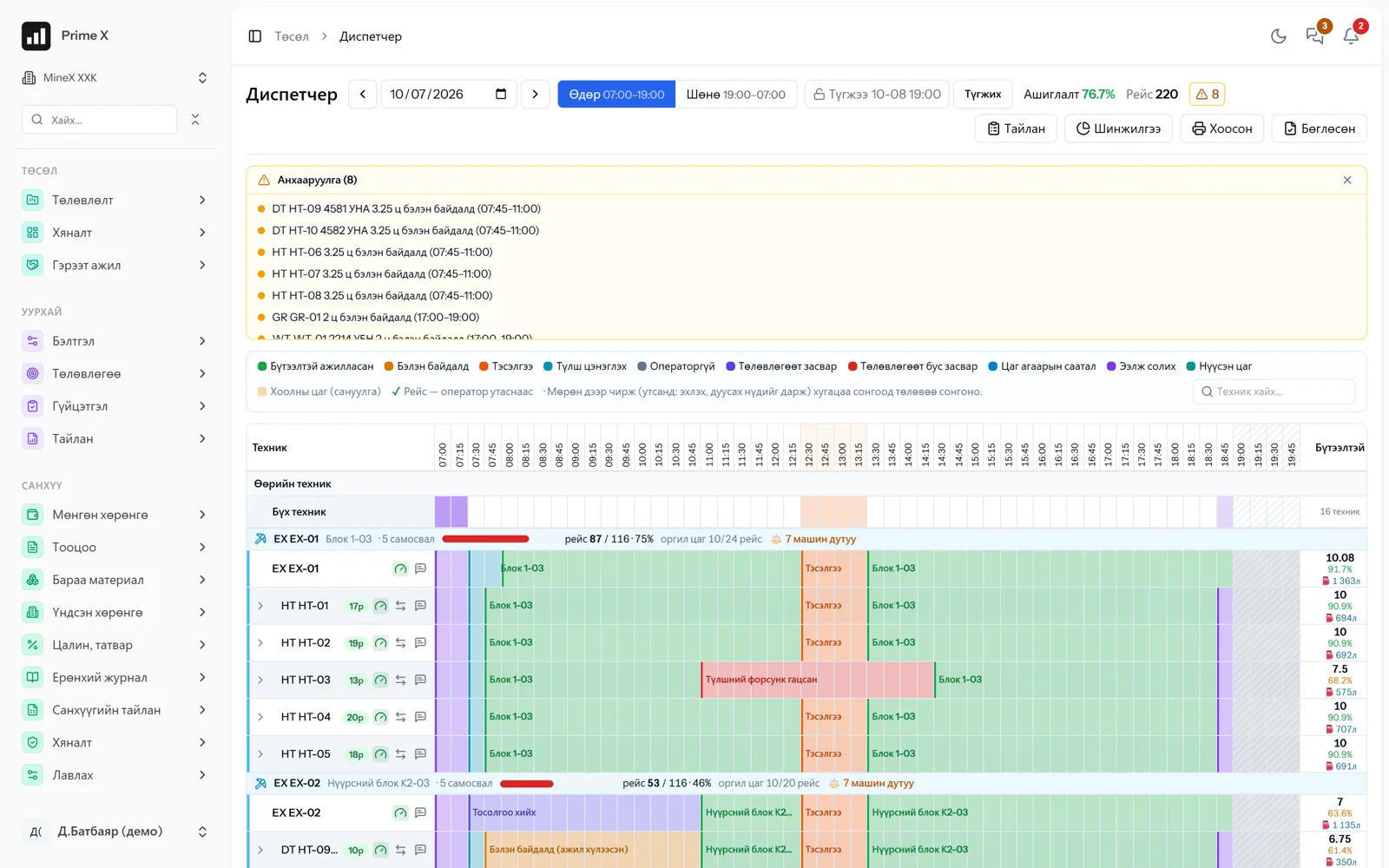
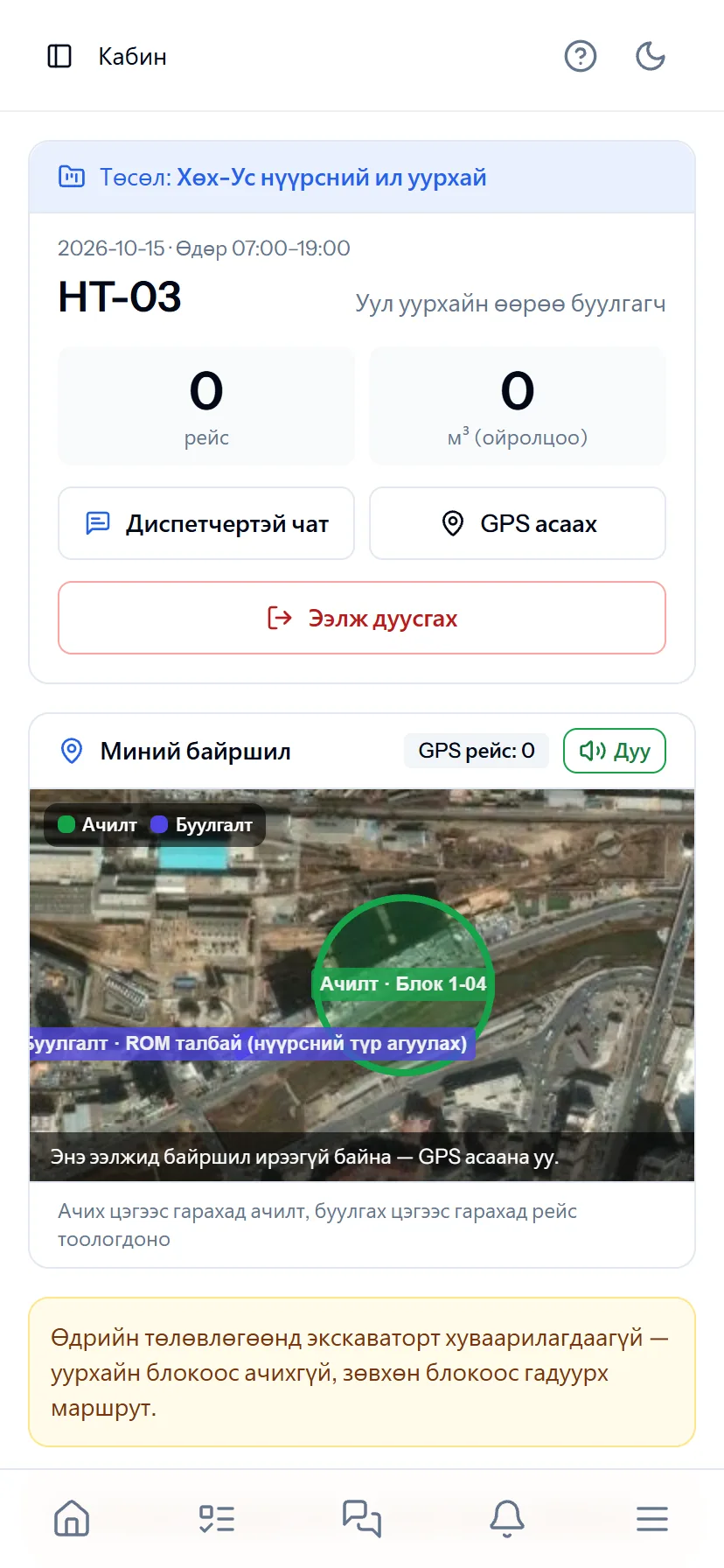
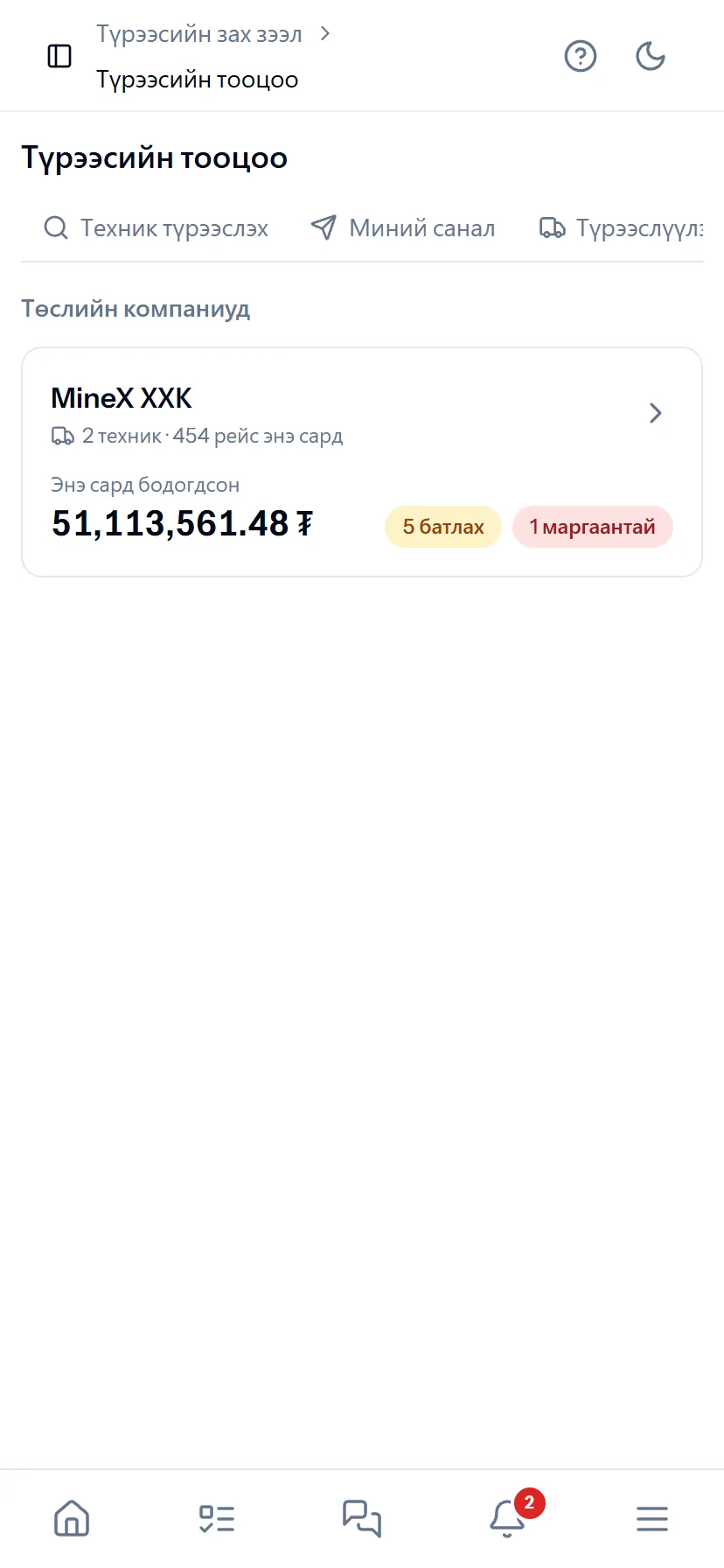
Demo company screen · sample data
Why
Four places where money is lost — and what Lite FMS does
A contractor’s or lessor’s income is made of two things: trips and hours. When those two numbers are disputed, money is lost every month.
Pain
Paper waybills, retyping into Excel
The operator fills in every shift’s waybill, the dispatcher types it in, and the accountant counts again at month end. Errors arise in three places.
In Lite FMS
The dispatcher table matches the paper waybill 1:1. Record once and the trip report, time usage, act and rental settlement come out by themselves.
Pain
Disputed trip counts
“We had 48 trips”, “we counted 44”. The client, the contractor and the surveyor have three different numbers.
In Lite FMS
A GPS tracker or the driver’s phone: when a truck leaves the loading zone and reaches the dumping zone, the trip counts itself. Weighbridge weights are reconciled with trips. One number for all three parties.
Pain
Disputes over the monthly rental settlement
At month end the lessor says “hours are missing” and the lessee says “it was standing idle”. Payment is delayed.
In Lite FMS
Every time a shift is locked, the day’s settlement goes to the lessor’s phone: approve or dispute, and with no reply in 48 hours it is approved automatically. Nothing is left to argue about at month end.
Pain
Idle time goes unnoticed
The excavator stood waiting for trucks, trucks stood queuing — it only shows in the monthly report, and by then it is too late.
In Lite FMS
Live dispatch: every truck’s stage (loading, queuing, loaded, dumping, empty, stopped), matching and alerts on the dispatcher’s phone within 5 minutes. Time usage by the TUM standard.
How it works
Six steps from entering equipment to act payment
Each step’s output is the next step’s input. There is nowhere to retype by hand.
-
1
Equipment, drivers
Register the equipment and assign its main driver. The driver signs in by phone and picks the machine.
-
2
Geofences
Draw the zone of every block, stockpile and crusher on the map — a circle or a polygon. Once.
-
3
The shift: Cab and dispatcher
The driver sets status and “+ TRIP” by phone; the dispatcher sees all machines on one table. Cab statuses fill the empty cells by themselves.
-
4
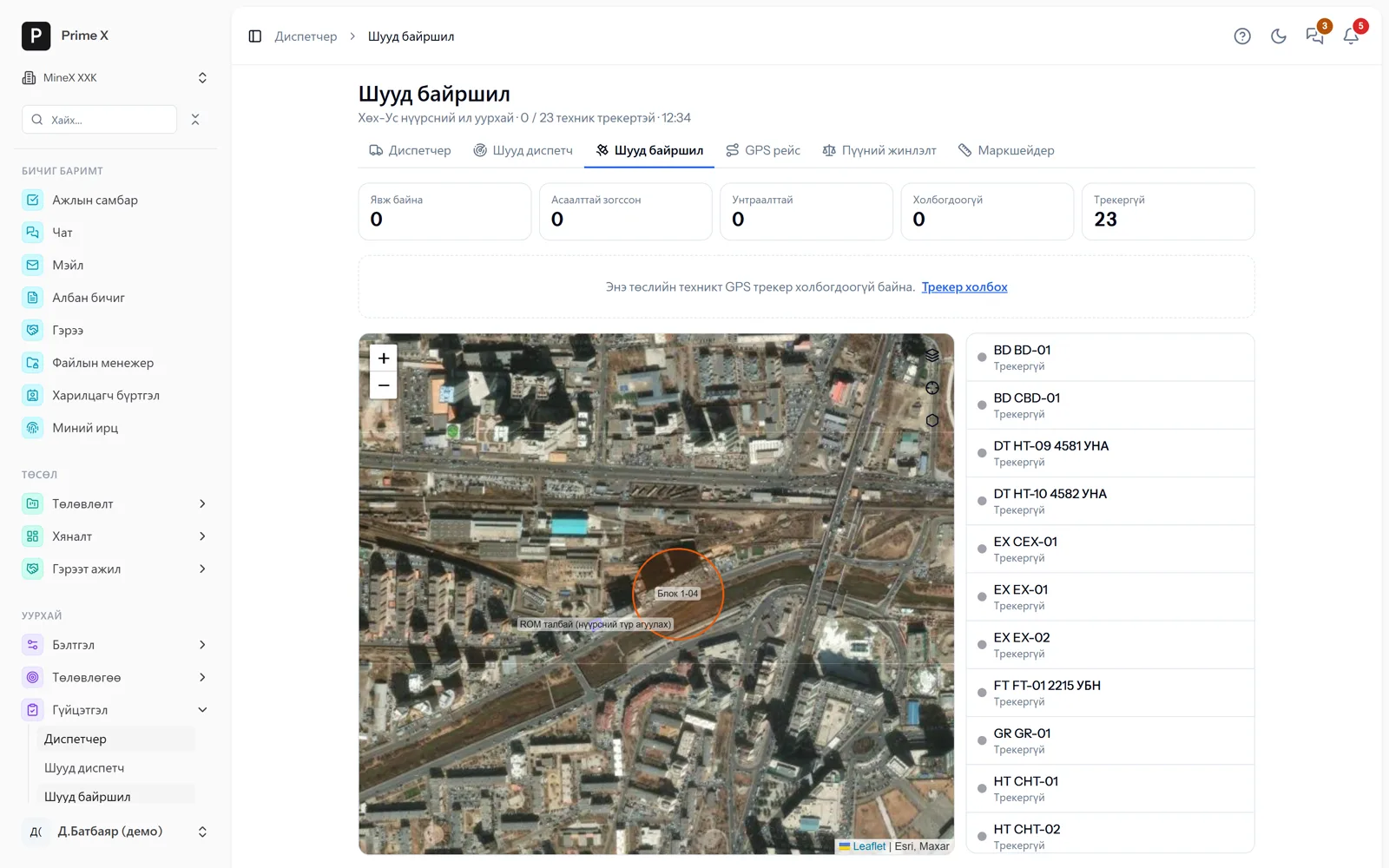
GPS trips, live dispatch
Every departure from the loading zone that reaches the dumping zone is a trip. Stages, matching, alerts and reassignment advice in real time.
-
5
Shift lock
Locks automatically 24 hours after the shift ends. Only locked figures go into acts and rental settlements.
-
6
Acts, rental settlements
Acts at contract rates (trips, hours, m³, weighbridge tonnes). The lessor approves daily; when both sides approve the monthly act it goes to finance automatically.
In the field
The driver’s phone is the tracker, waybill and chat
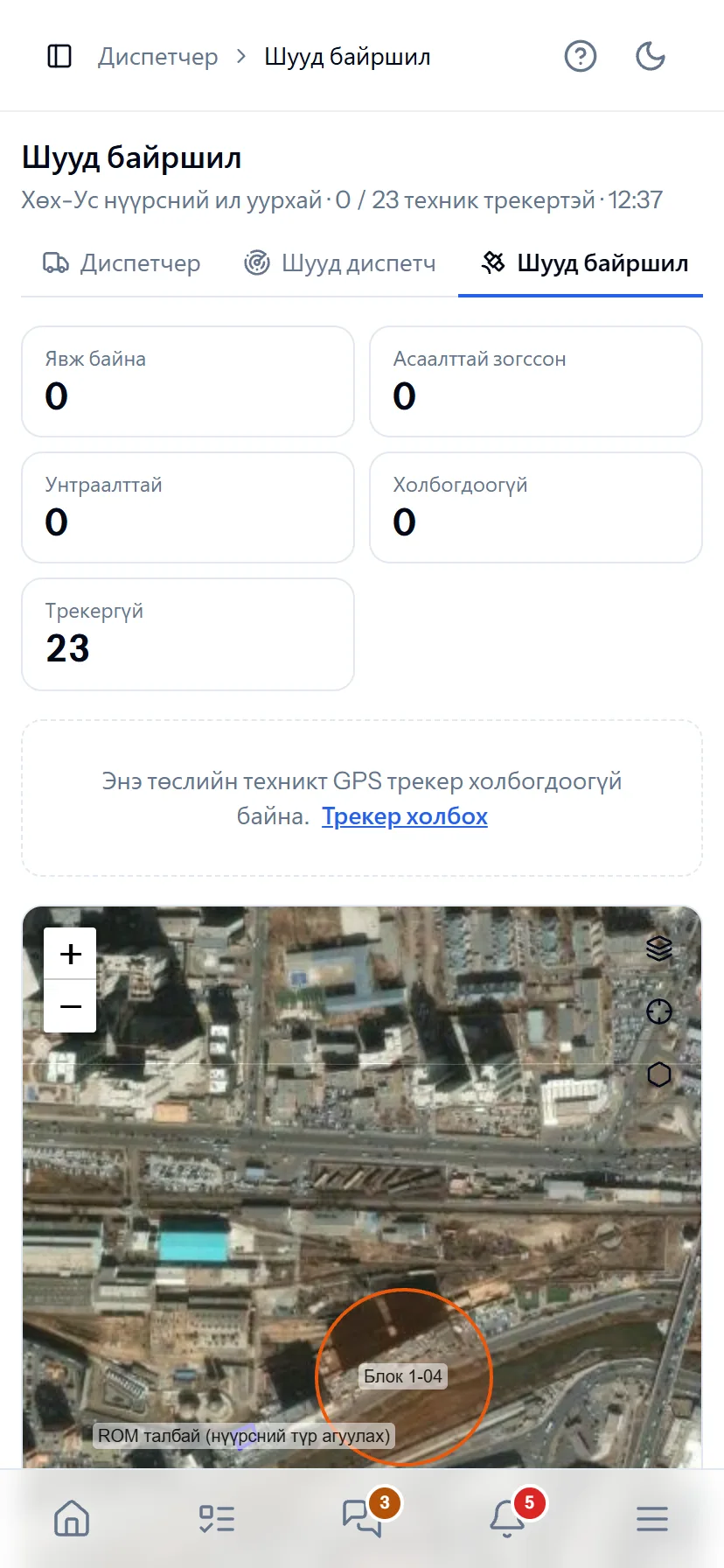
The driver opens the Cab app and picks the machine. One tap on a status (working, fuel, repair, broken down…) fills the empty cell in the dispatcher table by itself. Leaving the loading zone and reaching the dumping zone counts a trip and announces it by voice. After 5 minutes stopped it asks the reason. Recording a breakdown notifies the dispatcher immediately.
- Android app — sends GPS even with the screen off or the app closed
- On machines with a tracker the tracker takes priority; if it drops out, the phone is the backup
- Offline: up to 3,000 points on the phone, sent once the network returns
- Live dispatch: stages, matching, alerts, “Reassign” advice
Rental
Not at month end — settlements approved every day
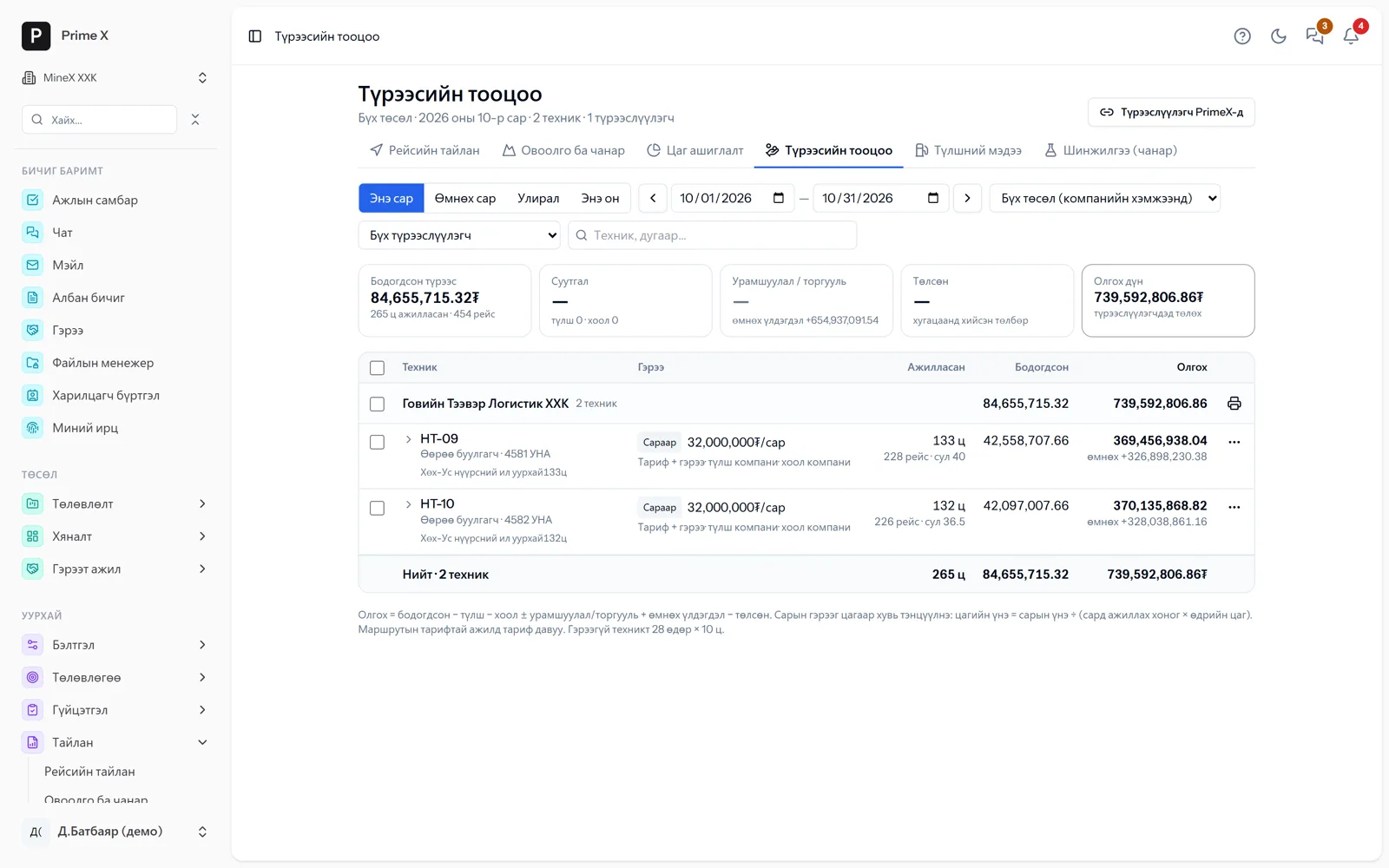
As soon as a shift is locked, that day’s trips, hours and ₮ for every rented machine are calculated and go to the lessor portal. Approve, or dispute with an explanation; with no reply in 48 hours it is approved automatically. If the lessee edits trips or hours, the previous and new values are kept and the lessor is notified immediately. When both sides approve the monthly act, a payable is posted for the lessee and a receivable for the lessor automatically.
- Contract terms: hour / month / trip, idle %, overtime %, minimum settlement
- Fuel and meal (catering) deductions, bonuses, penalties, previous balance
- The lessor sees only its own machines’ figures and rates
- Handover acts, breakdowns and delays (deducted from payment automatically), extensions
One set of numbers — for three parties
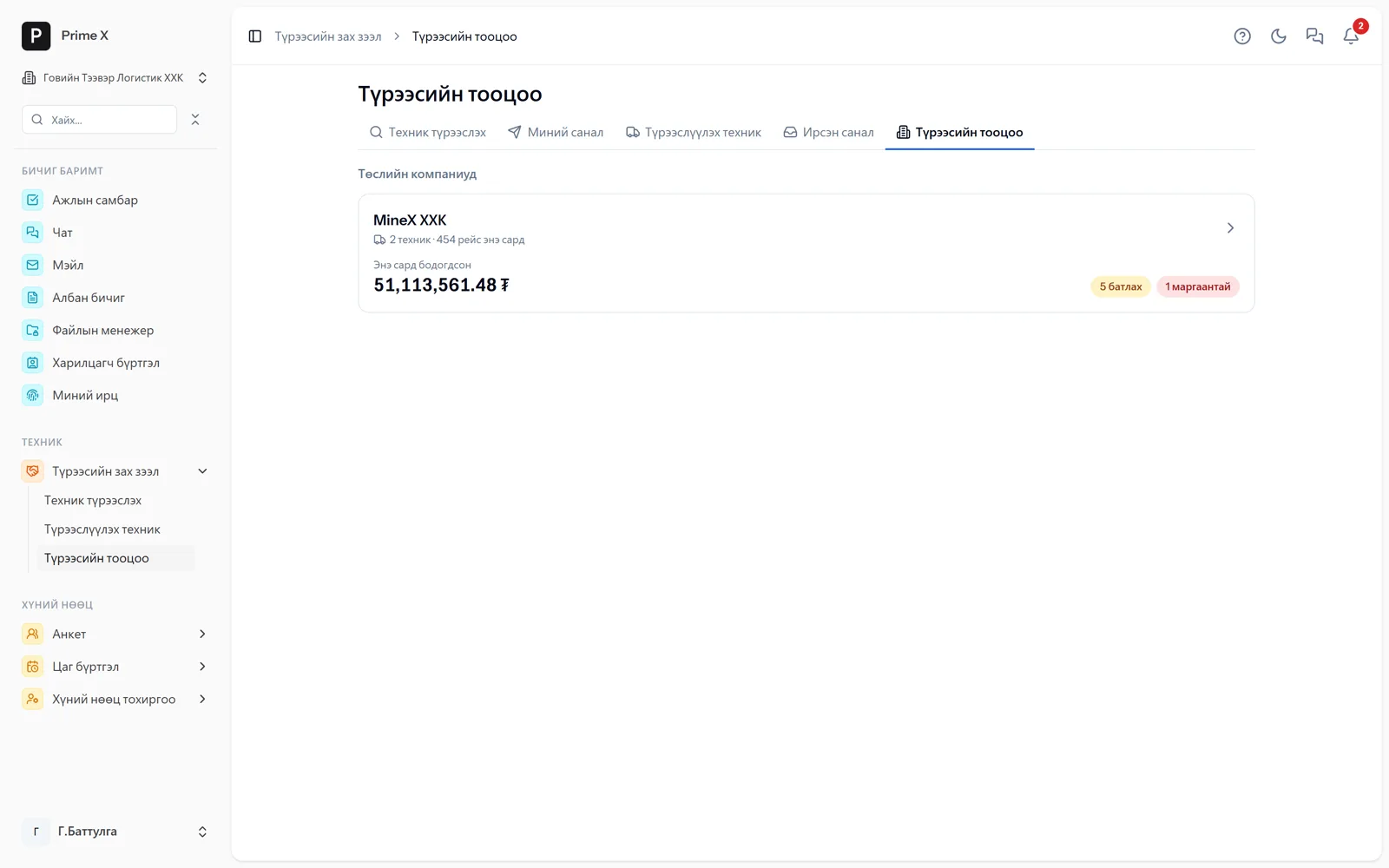
The contractor records, the client reconciles, the lessor approves — all three see one set of numbers
Mining work usually has three parties: the contractor that does the work, the client that accepts the acts, and the company that rents out the equipment. When each keeps its own waybills and Excel sheets, the numbers diverge at month end and disputes follow. In PrimeX the contractor starts by registering its own equipment, roster and dispatcher and begins working; then it brings in its client and lessors by project invitation. Every company keeps its own separate space, yet on that project the shared data — trips, hours, acts, settlements — looks the same to all three. If anyone edits a figure, the previous and new values are kept and the other parties are notified immediately. Accepting an invitation and using the portal are both free.
Contractor
InitiatorEnter your own equipment, drivers and dispatcher and start working. Trips, hours and acts are guaranteed.
- Dispatcher, Cab, GPS trips
- Time usage, idle time
- Acts at contract rates — PDF, Excel
- Settlements for rented equipment
Client — mine owner
Joins by invitationAccepts the project invitation, reconciles the contractor’s trips and measurements with its own figures, locks shifts and approves acts.
- Lock shifts, return for correction
- Reconcile with survey measurements
- Payable and receivable automatic on act approval
- Only shared information is visible
Lessor
Portal — freeCompanies and individuals renting out equipment enter the portal by invitation and approve daily settlements from the phone.
- Every day’s trips, hours, ₮ — approve / dispute
- Monthly act with both sides’ approval
- Only own equipment is visible
- List equipment on the marketplace
When one contractor joins PrimeX, its client and lessors follow by invitation; on the next project they invite their new contractors themselves. A lessor that lists its equipment appears in marketplace searches and wins new orders.
Why “Lite”
Without an external FMS’s devices, installation or licences — by Mongolian mining practice
Part of a big FMS is expensive hardware and installation. Lite FMS works with the phones and trackers you have, under the rules of Mongolian contract work.
Phone = tracker
No special device is required. A phone mounted in the cab sends location, trips and status. The PrimeX Cab Android app works even with the screen off.
Use the trackers you have
Teltonika, Ruptela, Queclink… 200+ protocols through Traccar. Webhooks from platforms such as Navixy and Wialon also come in as generic JSON.
Works without a network
Trips, statuses and GPS points are stored on the phone and sent with their own timestamps once the network returns. Zones are recognised on the phone itself and announced.
For Mongolian conditions
A table identical to the paper waybill, 24-hour shift lock, rental contract terms (idle %, overtime %, minimum settlement, fuel, meals), catering deductions — by Mongolian mining practice.
No app to install, 30 days free
Dispatchers and management open it from the browser. Sign up yourself and try for 30 days; the lessor portal is free for good.
If you have your own FMS
Import an external FMS’s trips by CSV and take PrimeX’s trips and time usage by API. The two systems’ numbers never diverge.
220 trips
in one shift from one dispatcher table
15 sec
live location and live dispatch refresh
24 hours
the shift locks automatically — the act’s guarantee
48 hours
if the lessor does not reply, the daily settlement is approved
200+
GPS tracker protocols through Traccar
0 ₮
lessor portal, registration
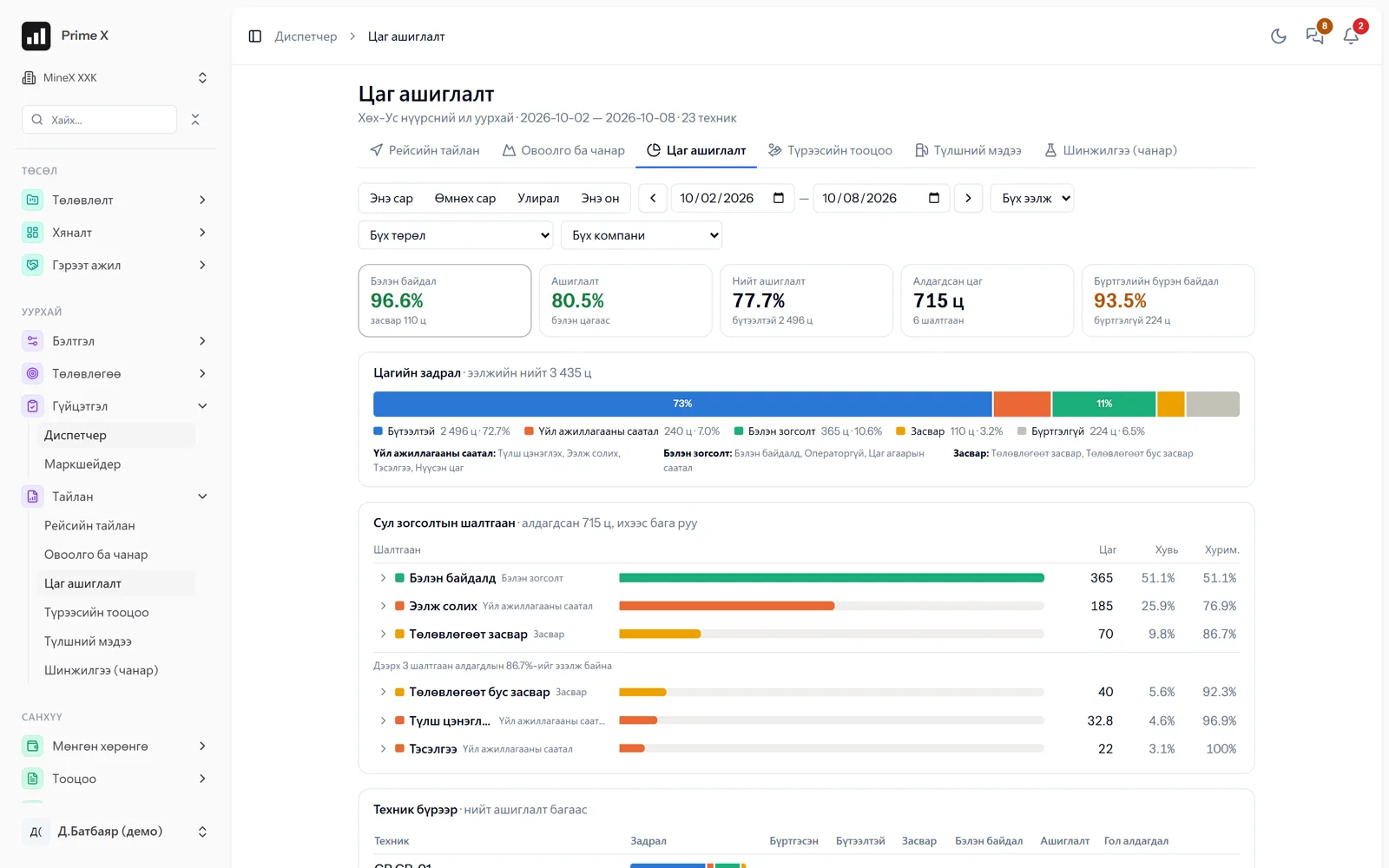
Time usage — by the international TUM standard
Availability, utilisation, operating efficiency, overall utilisation, MTBF/MTTR — from dispatcher records with one formula. A Pareto of idle-time reasons: which machine lost how many hours and why. The same classes as an external FMS’s export.
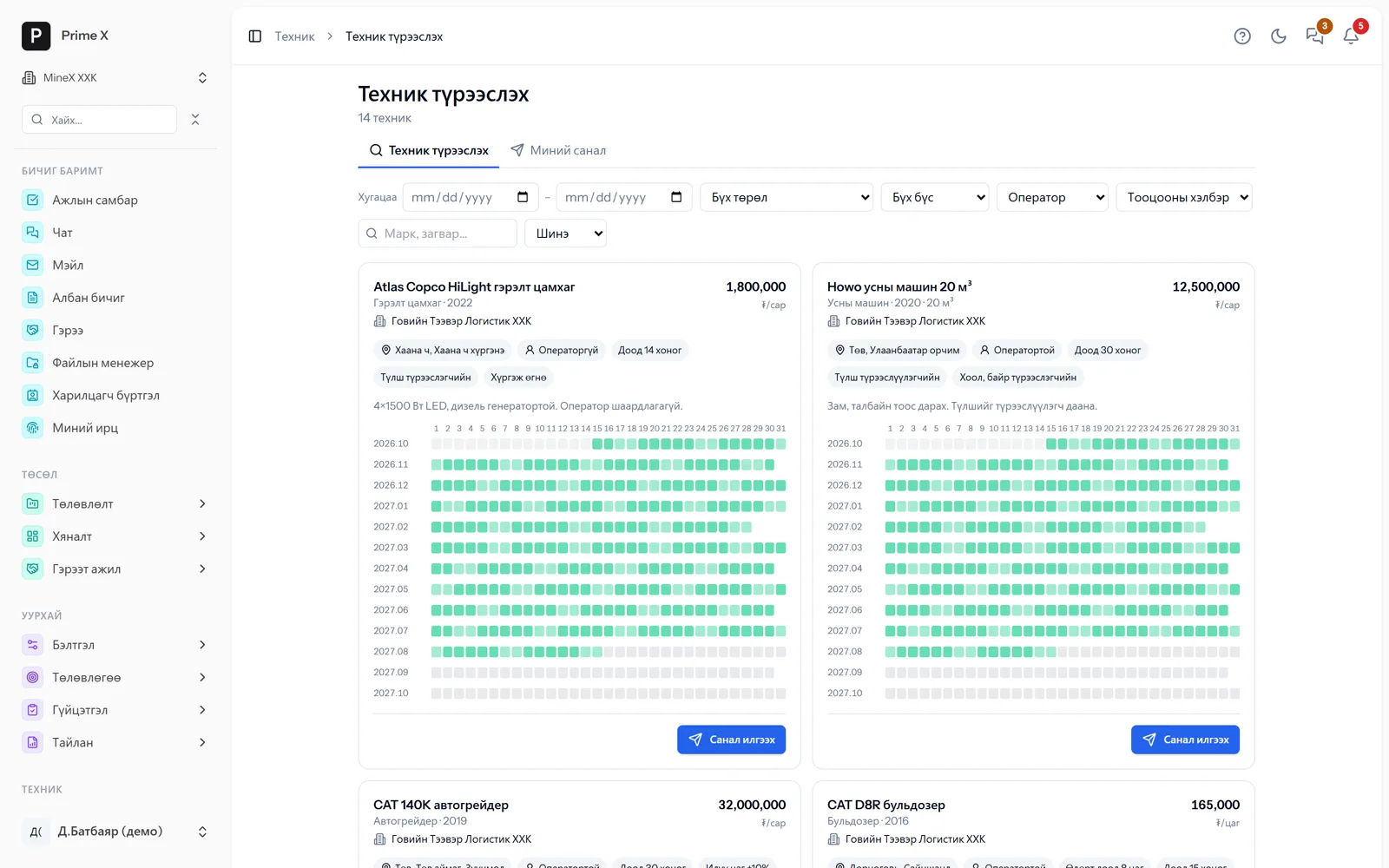
List your equipment and rent it out, find idle equipment and rent it
The lessor puts price, terms and busy dates on a calendar. The contractor searches by period, type and region and sends an offer; several companies compete. On agreement the contract, register and daily settlement are automatic. Details →
For whom
The first two targets
Mining contractors
Companies that do stripping, hauling and road work under contract. Their income is trips, hours, m³ and tonnes — and those numbers must not differ from the client’s.
- Dispatcher, Cab, GPS trips — on your own equipment
- Shift lock → act at contract rates → invoice
- Invite the client to make the numbers one
- Settle rented equipment with the lessor every day
Equipment-rental companies and individuals
They rent trucks, excavators, graders and water trucks to mines and road companies. Month-end disputes and delayed payments break their cash flow.
- The portal is free — approve daily settlements from the phone
- Only your own machines’ figures and rates are visible
- List on the marketplace, choose among offers, counter-offer
- When the monthly act is approved, the receivable and invoice are ready
For mine owners and management companies: every contractor’s trips, hours and acts from one screen — Collaboration. If you need the full system (projects, finance, HSE…), add modules — the data stays.
Frequently asked questions
About Lite FMS
Do I have to buy GPS trackers?
No. The driver’s phone (the PrimeX Cab app or the free Traccar Client) sends location and speed. On machines with a tracker the tracker takes priority and the phone is the backup if it drops out. Phone accuracy is 5–15 m, so geofence radii are at least 50 m.
What if our client does not use PrimeX?
You use it fully on your own: dispatcher, trips, time usage, and acts at contract rates as PDF and Excel. If the client joins PrimeX it approves that act directly and the numbers become the same on both sides — you send the invitation.
Does it work at a pit without a network?
Yes. The Cab stores trips, statuses and GPS points on the phone (up to 3,000 points) and sends them with their own timestamps once the network returns. Loading and dumping zones are recognised on the phone and announced by voice. The server re-checks late points so no trip is lost.
Which modules do I need? Price?
Lite FMS = the “Mining, roads” module (roster, dispatcher, GPS, trips, rental settlements) + Projects + Equipment. Finance, procurement, HSE and the rest can be added later. The lessor portal needs no module and is free. We give the price at the walkthrough by your number of machines; 30 days free.
We have our own FMS, weighbridge and sensors. Can they connect?
Import an external FMS’s trips by CSV and the dispatcher approves them; pull PrimeX’s trips and time usage (TUM classes) by API for up to 31 days. When the weighbridge software sends tickets by API or CSV, the machine is found by plate number and matched to a trip within ±30 minutes. Traccar fuel and load sensor values are read.
Will drivers use a new system?
The Cab has one screen: pick the machine, tap the status, “+ TRIP”. GPS counts trips itself, so nothing is lost if they forget to tap. After 5 minutes stopped it asks the reason. Chat with the dispatcher is one tap away.
Better in real life
Screenshots show only a small part of the system
A screenshot shows just one moment. On the real system, when the dispatcher changes a status you see the trip report change, the act appear and the ledger entry go in. The best way is 30 minutes together on your company’s data.
- With your equipment, employees and project names
- Questions answered on the spot and shown on screen
- Online or at your office
- No obligation, no charge
See it on the real system
Request a walkthrough Try the dispatcherThere is no open demo. Walkthroughs are done only at your request, for your company.
Ready to run your company on one system?
Screenshots do not fully show how it works in practice. We give a 30-minute walkthrough on your company’s data and draw up an implementation plan together — office, factory, clinic, road or mine, the whole system or a single module. If you have foreign investors we show the English and Chinese interfaces too.